QueryBench vs TablePlus
TablePlus set the bar for simple, native database clients, and QueryBench borrows its taste. These are the places where we made different choices, and why.
Undo after commit
QueryBench
Stash captures the original rows inside the same transaction as your update or delete, then hands you recovery SQL to review and run.
TablePlus
Code review and Safe mode confirm statements before they run.
Complete backups
QueryBench
Native pg_dump, mysqldump, VACUUM INTO or EXPORT DATABASE into a local gzip archive, with optional upload to S3 or any compatible endpoint.
TablePlus
SQL dump export and import.
Mobile
QueryBench
A phone is part of every license: iOS or Android, running the same Go adapters locally.
TablePlus
iOS app, free for license owners.
AI agents
QueryBench
Built-in MCP server: loopback only, token protected, and bound by the connection's No-Edit rules.
TablePlus
JavaScript plugins, in beta.
Updates
QueryBench
Every update included. The license never expires.
TablePlus
One year of updates with a license; renew to keep updating.
License
QueryBench
$29.99 once, perpetual, one computer and one phone per key.
TablePlus
$99 once for one device, or $129 for two; iOS app free for license owners.
Teams
QueryBench
Same license, one per person, up to 100 in one checkout. Invoices are automatic; purchase orders and wire transfer on request.
TablePlus
$79 per seat once, starting at three seats, with one year of updates.
Reviewing changes
QueryBench
Staged edits and DDL become a list of parameterized statements with bound values, committed atomically where the engine allows.
TablePlus
Code review shows the statements before they are sent.
Exports
QueryBench
CSV, JSON, SQL and Excel with no row cap, streamed to disk with progress and cancellation.
TablePlus
Export to CSV, JSON, SQL and other formats.
Engines
QueryBench
Seven: PostgreSQL, MySQL, SQLite, DuckDB, ClickHouse, MongoDB and Redis.
TablePlus
Fourteen, including SQL Server, Oracle, Cassandra and BigQuery.
| Topic | QueryBench | TablePlus |
|---|---|---|
| Undo after commit | Stash captures the original rows inside the same transaction as your update or delete, then hands you recovery SQL to review and run. | Code review and Safe mode confirm statements before they run. |
| Complete backups | Native pg_dump, mysqldump, VACUUM INTO or EXPORT DATABASE into a local gzip archive, with optional upload to S3 or any compatible endpoint. | SQL dump export and import. |
| Mobile | A phone is part of every license: iOS or Android, running the same Go adapters locally. | iOS app, free for license owners. |
| AI agents | Built-in MCP server: loopback only, token protected, and bound by the connection's No-Edit rules. | JavaScript plugins, in beta. |
| Updates | Every update included. The license never expires. | One year of updates with a license; renew to keep updating. |
| License | $29.99 once, perpetual, one computer and one phone per key. | $99 once for one device, or $129 for two; iOS app free for license owners. |
| Teams | Same license, one per person, up to 100 in one checkout. Invoices are automatic; purchase orders and wire transfer on request. | $79 per seat once, starting at three seats, with one year of updates. |
| Reviewing changes | Staged edits and DDL become a list of parameterized statements with bound values, committed atomically where the engine allows. | Code review shows the statements before they are sent. |
| Exports | CSV, JSON, SQL and Excel with no row cap, streamed to disk with progress and cancellation. | Export to CSV, JSON, SQL and other formats. |
| Engines | Seven: PostgreSQL, MySQL, SQLite, DuckDB, ClickHouse, MongoDB and Redis. | Fourteen, including SQL Server, Oracle, Cassandra and BigQuery. |
TablePlus details taken from tableplus.com on September 8, 2026. TablePlus is a trademark of its owner; QueryBench is not affiliated with it.
Difference one
Roll back after you commit
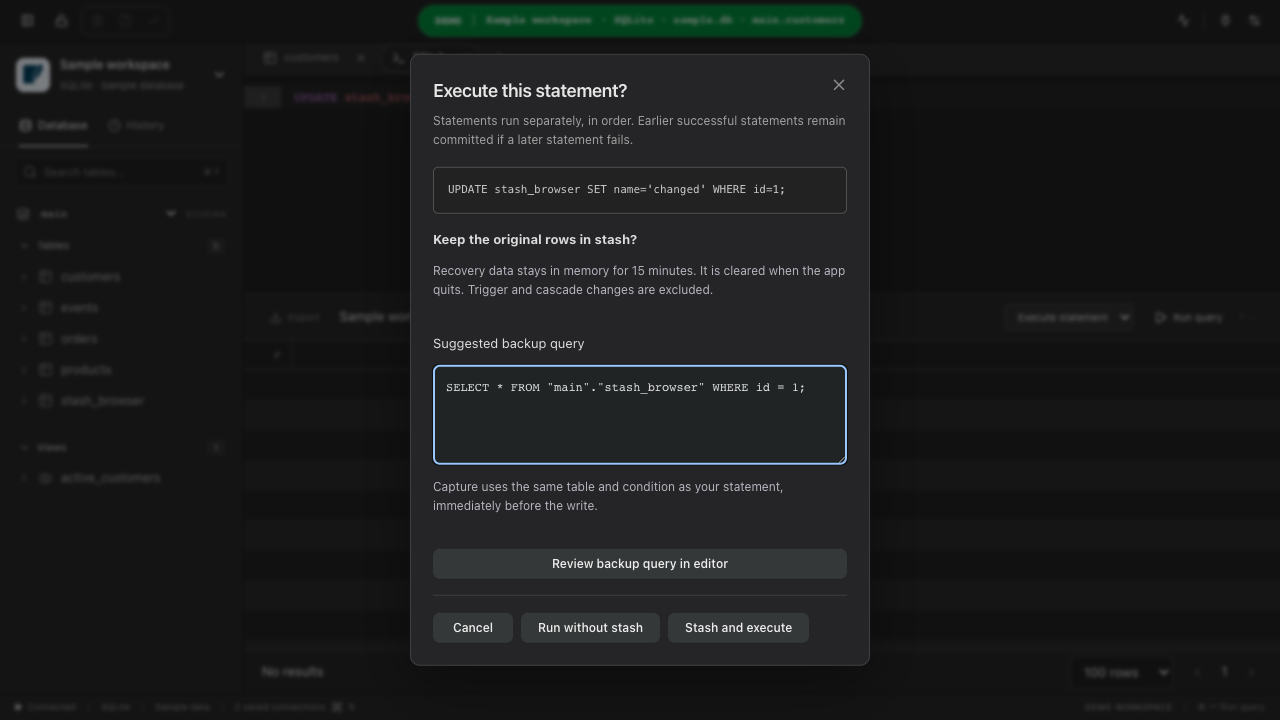
Every client asks “are you sure?” before an UPDATE. Stash is for the moment after you said yes. Here is exactly what happens.
A way back, in two steps
Originals stay in memory for 15 minutes by default. Adjust retention in Settings. Recovery always needs your review.
What to know before recovering
- Rollback is a new write. If someone else changed the row after you, restoring the old values overwrites their change too, which is why you review first.
- Triggers and cascades that fired with the original statement are not reversed.
- Capture adapters today: PostgreSQL, MySQL, SQLite and DuckDB. Other engines refuse writes while Stash is on rather than pretending.
- Manual SQL is covered for single-table UPDATE and DELETE with literal values and a WHERE clause of AND-joined comparisons, plus INSERT with literal VALUES. Anything QueryBench cannot prove safe is rejected before it runs.
- Stash is opt-in in Settings and is not a backup. For that, use complete backups.
Difference two
Complete backups, straight to S3
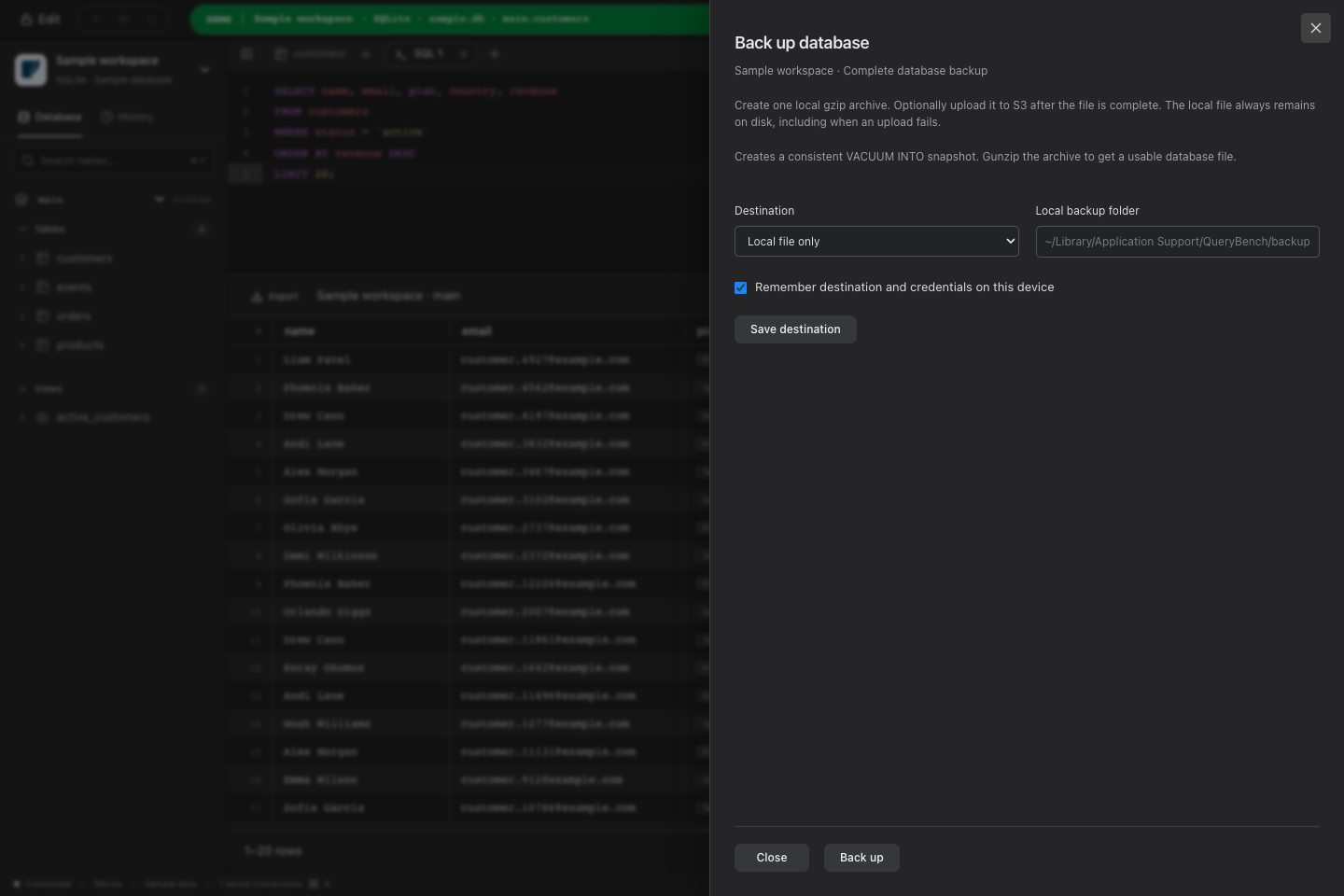
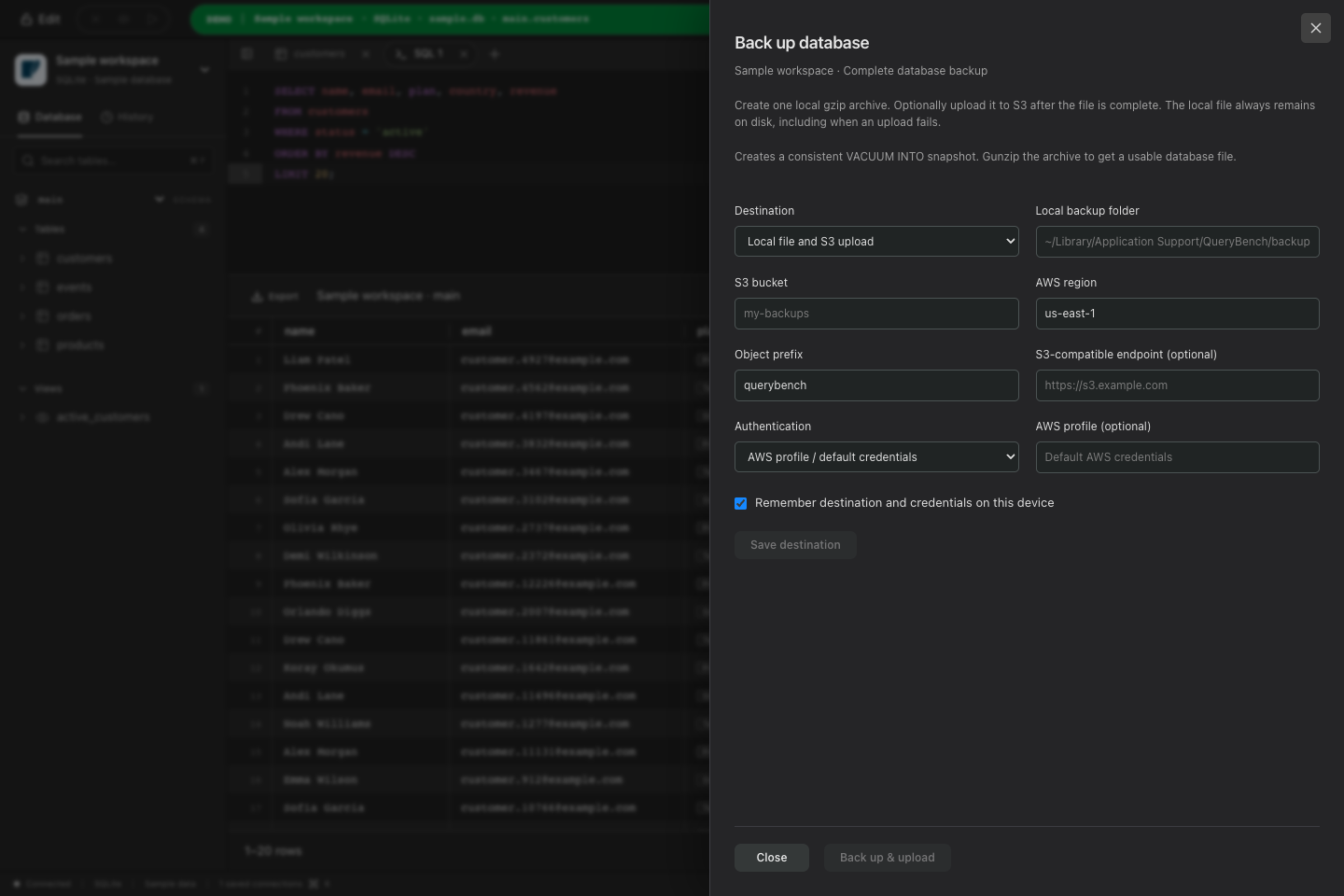
A table export is not a backup. QueryBench runs the engine's own backup tool, keeps the archive on disk, and can ship it to S3 or any compatible store without a separate script.
- 1
Native tools, real backups
PostgreSQL uses pg_dump, MySQL uses mysqldump with routines, triggers and events, SQLite takes a consistent VACUUM INTO snapshot, DuckDB runs EXPORT DATABASE. Restores work with the engine's own tools.
- 2
One gzip archive, finished before anything uploads
The backup streams into a single local file, is synced to disk, and only then is eligible for upload. Partial files never leave your machine and are removed if a backup is cancelled or fails.
- 3
Optional S3 upload, retry without redoing the dump
Point it at a bucket, region and prefix, or any S3-compatible endpoint over HTTPS. Uploads use signed multipart requests with bounded concurrency. If the upload fails, retry from the completed local archive.
- 4
Credentials stay in the keychain
Access keys and session tokens are saved per connection in the operating-system credential store. They are never returned to the interface, written to JSON, or included in connection archives.
| Engine | Backup method | Archive |
|---|---|---|
| PostgreSQL | pg_dump plain SQL for the selected database | .sql.gz |
| MySQL | mysqldump with routines, triggers and events | .sql.gz |
| SQLite | Consistent VACUUM INTO snapshot | .sqlite.gz |
| DuckDB | Native EXPORT DATABASE with schema and data | .tar.gz |
MongoDB, Redis and ClickHouse do not claim complete backup support yet. QueryBench never labels a table export as a backup.
The smaller differences
Android and iOS, included
Both phone apps run the real Go database adapters on the device and keep passwords in the platform keychain. Every license includes the desktop and phone versions, with one computer and one phone active at the same time.
An MCP server, not a plugin API
Turn it on and any MCP-capable agent can list databases, describe tables and run paginated queries. It binds to loopback, needs a per-session token, and cannot unlock a No-Edit connection.
Updates that do not expire
Every QueryBench license is a one-time purchase that keeps receiving updates. Teams buy the same license, one per person, and never pay again for the people they already covered.
Coming from TablePlus?
QueryBench imports TablePlus connection archives, including the encrypted ones, so your saved connections come with you.